The Abstract Factory Pattern
The Abstract Factory Pattern
🔐 Overview
The Abstract Factory pattern provides an interface for creating families of related or dependent objects without specifying their concrete classes:
- Encapsulates object creation logic
- Ensures compatibility between created objects
- Supports easy addition of new product families
🧭 Contents
- Understanding the Pattern
- Implementation Guide
- Common Use Cases
- Best Practices
- Real World Examples
🔄 Understanding the Pattern
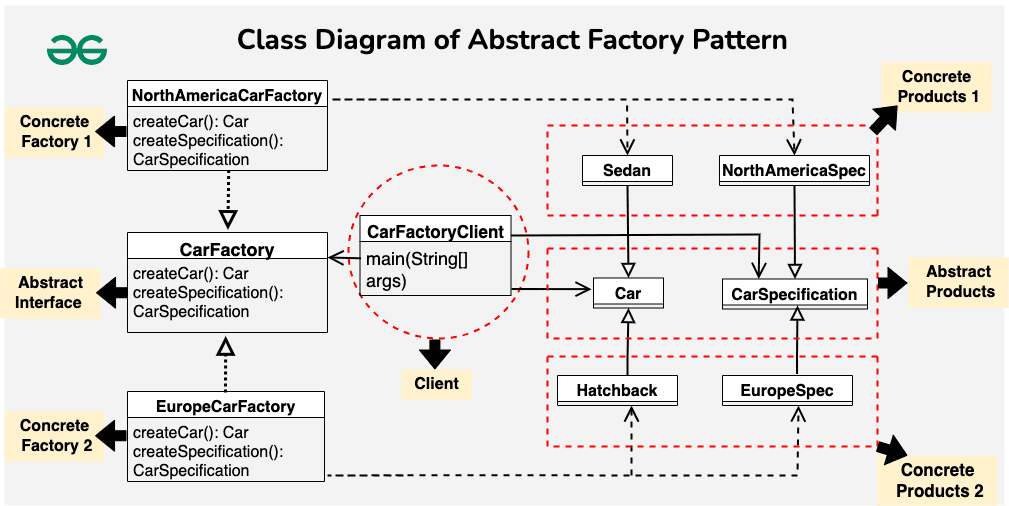
The Abstract Factory pattern consists of several key components:
- Abstract Factory
- Declares interface for creating product objects
- Contains abstract creation methods
- Defines contract for concrete factories
- Concrete Factory
- Implements creation methods
- Creates concrete product instances
- Ensures product compatibility
- Abstract Product
- Declares interface for product objects
- Defines common product behavior
- Groups related products
- Concrete Product
- Implements product interfaces
- Provides specific functionality
- Works with other compatible products
🛠️ Implementation Guide
Here’s a basic implementation in Java showing how to create UI elements for different operating systems:
// Abstract Products
interface Button {
    void render();
    void onClick();
}

interface TextField {
    void render();
    void onType();
}

// Concrete Products for Windows
class WindowsButton implements Button {
    @Override
    public void render() {
        System.out.println("Rendering Windows-style button");
    }

    @Override
    public void onClick() {
        System.out.println("Windows button click animation");
    }
}

class WindowsTextField implements TextField {
    @Override
    public void render() {
        System.out.println("Rendering Windows-style text field");
    }

    @Override
    public void onType() {
        System.out.println("Windows text field typing animation");
    }
}

// Concrete Products for MacOS
class MacButton implements Button {
    @Override
    public void render() {
        System.out.println("Rendering MacOS-style button");
    }

    @Override
    public void onClick() {
        System.out.println("MacOS button click animation");
    }
}

class MacTextField implements TextField {
    @Override
    public void render() {
        System.out.println("Rendering MacOS-style text field");
    }

    @Override
    public void onType() {
        System.out.println("MacOS text field typing animation");
    }
}

// Abstract Factory
interface UIFactory {
    Button createButton();
    TextField createTextField();
}

// Concrete Factories
class WindowsUIFactory implements UIFactory {
    @Override
    public Button createButton() {
        return new WindowsButton();
    }

    @Override
    public TextField createTextField() {
        return new WindowsTextField();
    }
}

class MacUIFactory implements UIFactory {
    @Override
    public Button createButton() {
        return new MacButton();
    }

    @Override
    public TextField createTextField() {
        return new MacTextField();
    }
}

// Client code
class Application {
    private final UIFactory factory;
    private Button button;
    private TextField textField;

    public Application(UIFactory factory) {
        this.factory = factory;
    }

    public void createUI() {
        button = factory.createButton();
        textField = factory.createTextField();
    }

    public void renderUI() {
        button.render();
        textField.render();
    }
}

// Usage Example
public class Main {
    public static void main(String[] args) {
        // Create Windows UI
        Application windowsApp = new Application(new WindowsUIFactory());
        windowsApp.createUI();
        windowsApp.renderUI();

        // Create MacOS UI
        Application macApp = new Application(new MacUIFactory());
        macApp.createUI();
        macApp.renderUI();
    }
}
This implementation demonstrates how to use the Abstract Factory pattern to create UI elements that maintain consistency across different operating systems. The key components are:
- Abstract Products (
Button,TextField): Define interfaces for UI components - Concrete Products (
WindowsButton,MacButton, etc.): Implement the interfaces for specific OS styles - Abstract Factory (
UIFactory): Declares methods for creating UI components - Concrete Factories (
WindowsUIFactory,MacUIFactory): Create OS-specific components - Client (
Application): Uses the factory to create and manage UI components
Running the example will create and render UI elements in both Windows and MacOS styles, demonstrating how the pattern allows for easy switching between different “families” of related objects.
- GUI Frameworks
- JavaFX scene graph creation
- Cross-platform widget toolkits
- Document Processing
- PDF/Word document generation
- Multiple format exporters
- Database Connectivity
- JDBC drivers and connections
- ORM implementations
🎯 Best Practices
- Use when:
- System needs to be independent of product creation
- System should work with multiple product families
- Product families are designed to be used together
- Consider alternatives:
- Factory Method for simpler cases
- Builder when dealing with complex objects
- Prototype for copying existing instances